Agentforce is Salesforce’s biggest bet since Lightning. It’s the platform for building autonomous AI agents that can handle tasks across your entire org — from answering customer questions to updating records, triggering flows, and making decisions.
But if you strip away the marketing, what is it actually? How does it work? And what do you, as a developer, need to know?
Let’s break it down.
The Big Picture
At its core, Agentforce is a framework with four layers:
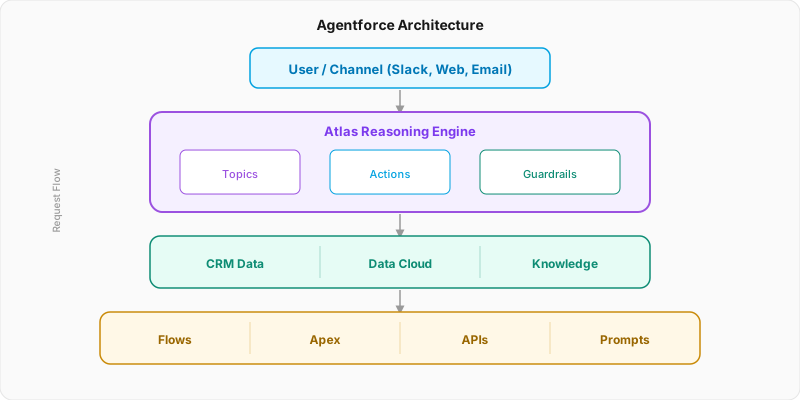
┌─────────────────────────────────────────────┐
│              USER / CHANNEL                  │
│     (Slack, Web, Email, SMS, Portal)        │
├─────────────────────────────────────────────┤
│           ATLAS REASONING ENGINE            │
│  ┌──────────┐ ┌──────────┐ ┌────────────┐  │
│  │  Topics  │ │  Actions │ │ Guardrails │  │
│  └──────────┘ └──────────┘ └────────────┘  │
├─────────────────────────────────────────────┤
│              DATA LAYER                      │
│  ┌───────┐ ┌───────────┐ ┌──────────────┐  │
│  │  CRM  │ │ Data Cloud│ │  Knowledge   │  │
│  └───────┘ └───────────┘ └──────────────┘  │
├─────────────────────────────────────────────┤
│            ACTION LAYER                      │
│  ┌───────┐ ┌───────┐ ┌────────┐ ┌───────┐  │
│  │ Flows │ │ Apex  │ │  APIs  │ │Prompts│  │
│  └───────┘ └───────┘ └────────┘ └───────┘  │
└─────────────────────────────────────────────┘
A user sends a message. The Atlas Reasoning Engine figures out what the user wants, picks the right topic, selects the appropriate actions, checks the guardrails, pulls data from the data layer, executes actions through the action layer, and returns a response.
All of this happens autonomously. No human in the loop (unless the guardrails require one).
The Atlas Reasoning Engine
This is the brain. When a request comes in, Atlas doesn’t just pattern-match — it reasons through a multi-step process:
User says: "What's the status of my open cases
            and escalate anything older than 7 days"

Atlas Reasoning:
  1. CLASSIFY  → This is about "Case Management" (topic match)
  2. PLAN      → Two sub-tasks:
                  a) Query open cases for this user
                  b) Check age, escalate if > 7 days
  3. RETRIEVE  → Pull case data from CRM
  4. EXECUTE   → Run "Get Cases" action, then "Escalate Case" action
  5. VALIDATE  → Check guardrails (can this user escalate?)
  6. RESPOND   → "You have 3 open cases. I've escalated
Case #1042 (12 days old) to Tier 2."Atlas builds an action plan before executing anything. It can handle multi-step requests, chain actions together, and adapt when intermediate steps fail. This is reasoning, not simple pattern matching.
The Three Building Blocks
Every agent is defined by three things: Topics, Actions, and Guardrails.
1. Topics
A topic is a scope of responsibility. It tells the agent “this is your domain” with natural language instructions.
Topic: Order Management
Description: Handle customer inquiries about orders,
             shipping, returns, and refunds.

Instructions:
  - Always verify the customer's identity first
  - For returns, check if within 30-day window
  - Never process refunds over $500 without human approval
  - Use a friendly, professional tone

Trigger: When the customer asks about orders,
         shipping, tracking, returns, or refunds
An agent can have multiple topics. Atlas evaluates the user’s request and routes it to the most relevant topic. Think of topics as the “departments” of your agent.
2. Actions
Actions are the things the agent can do. They map directly to existing Salesforce automation:
| Action Type | Source | Example |
|---|---|---|
| Flow Action | Flow Builder | ”Create a return case and send email” |
| Apex Action | @InvocableMethod | ”Calculate shipping cost” |
| API Action | MuleSoft/REST | ”Check inventory in ERP” |
| Prompt Action | Prompt Builder | ”Generate a personalized response” |
You don’t write new code for Agentforce. You expose your existing Flows, Apex classes, and APIs as actions. The agent orchestrates them.
// This existing Apex becomes an Agentforce action
@InvocableMethod(
    label='Calculate Return Eligibility'
    description='Checks if an order is eligible for return based on purchase date and condition'
)
public static List<ReturnResult> checkEligibility(
    List<ReturnRequest> requests
) {
    // Your existing business logic
    ReturnRequest req = requests[0];

    ReturnResult result = new ReturnResult();
    result.eligible = req.purchaseDate.daysBetween(Date.today()) <= 30;
    result.reason = result.eligible
        ? 'Within 30-day return window'
        : 'Past 30-day return window';

    return new List<ReturnResult>{ result };
}
That @InvocableMethod annotation is all it takes. Atlas discovers it, understands the input/output schema from the description, and can call it autonomously.
Problem: A developer is asked to build an Agentforce action for checking return eligibility. They start writing a new Apex class specifically for the agent, duplicating logic that already exists in the org’s order management system. Two weeks in, the logic drifts — the agent uses different rules than the existing process.
Solution: Add @InvocableMethod to the existing eligibility method with a clear label and description. The agent calls the exact same code as every other process in the org. One source of truth — no drift, no duplication, and the agent automatically benefits from any future logic improvements.
3. Guardrails
Guardrails are the safety net. They prevent the agent from going rogue:
Guardrails for Order Management Agent:

NEVER:
  - Process refunds over $500 without human approval
  - Access medical or financial PII
  - Make promises about delivery dates not in the system
  - Respond to questions outside order management scope

ALWAYS:
  - Verify customer identity before accessing order data
  - Log all actions to the audit trail
  - Escalate to human if confidence < 80%
  - Use the Einstein Trust Layer for all LLM calls
Guardrails are enforced at runtime. If the agent’s planned action violates a guardrail, execution stops and the request is escalated.
The Einstein Trust Layer
Einstein Trust Layer Security Pipeline
This is the security architecture that makes enterprise AI possible:
User Input
    |
    v
  DATA MASKING        ← PII stripped before LLM call
  (remove SSN, CC#)
  PROMPT DEFENSE      ← Injection attacks blocked
  (sanitize input)
  LLM CALL            ← No data retention by LLM provider
  (zero retention)
  TOXICITY CHECK      ← Harmful content filtered
  (safety filter)
  GROUNDING CHECK     ← Verify against CRM data
  (fact verification)
  AUDIT LOG           ← Every step recorded
  (full trace)
    |
    v
Agent Response
Every LLM interaction passes through this pipeline. Your sensitive data is masked before it leaves Salesforce, the LLM provider (OpenAI/Anthropic) has zero data retention, and every response is grounded against your actual CRM data before being shown to the user.
Agent Script: The New DSL (Spring ‘26)
The biggest Spring ‘26 addition is Agent Script — a new domain-specific language that combines natural language with programmatic logic:
# Agent Script Example
system_prompt: |
  You are a Salesforce support agent.
  Be concise and professional.

variables:
  customer_name: string
  case_id: string
  priority: string

topic: Case Resolution
  instructions: |
    Help customers resolve their open cases.
    Always check case status before taking action.

  if priority == "Critical":
    action: EscalateToCriticalTeam
    say: "I've escalated case {case_id} to our critical
          response team. You'll hear back within 1 hour."
  else:
    action: GetCaseDetails
    reason: "Let me check the current status."
say: "Here's what I found for case {case_id}..."Pure LLM-driven agents are unpredictable. An agent that “gets it right 93% of the time” sounds great — until you realize that at scale, 7% failure rate means thousands of wrong actions per day. Agent Script gives you deterministic control over business-critical paths while still using AI for the natural language parts.
Problem: A financial services company deploys a pure LLM-driven Agentforce agent to handle refund requests. It works correctly 94% of the time in testing. In production at scale, that 6% failure rate translates to hundreds of incorrectly processed refunds per day — some approved when they shouldn’t be, some denied when they should be approved. The business pulls the agent.
Solution: Rewrite the critical refund approval path using Agent Script with explicit if/else logic for the approval threshold. The LLM handles natural language understanding and communication; Agent Script handles the deterministic business rules. Failure rate on the approval decision drops to near zero, and the agent is safely redeployed.
Building Your First Agent: Step by Step
Step 1: Identify the Use Case
Pick something narrow and well-defined. “Handle all customer interactions” is too broad. “Answer questions about order status and process simple returns” is perfect.
Good first agent candidates:
- IT help desk for internal employees
- Order status lookup for customers
- Knowledge article recommendation
- Simple case triage and routing
Step 2: Build the Actions First
Before touching Agentforce Builder, make sure your automations work:
- Create the Flows that handle the business logic
- Write the Apex classes with
@InvocableMethod - Set up Prompt Templates in Prompt Builder
- Test everything independently
Step 3: Create the Agent in Agentforce Builder
In Agentforce Builder (Setup > Agentforce > Agents):
- Create a new agent
- Define topics with clear instructions
- Map actions to each topic
- Set guardrails
- Test in Agent Grid
Step 4: Test with Agent Grid
Agent Grid is a spreadsheet-like testing tool (new in Spring ‘26):
| Test Input | Expected Output |
|---|---|
| ”What’s my order status?” | Shows order #, status, ETA |
| ”I want to return item” | Checks eligibility, starts return |
| ”Cancel my subscription” | Escalates to human (guardrail) |
| “Tell me a joke” | Politely declines (off-topic) |
Run it against real CRM data. Every test case shows the agent’s reasoning chain, actions taken, and final response.
Step 5: Deploy to Channels
Agents can be deployed to:
- Salesforce UI (embedded in record pages)
- Experience Cloud (customer portals)
- Slack (via Slack integration)
- API (any external application)
- Email (auto-respond to incoming emails)
What Developers Should Do Right Now
Before building anything in Agentforce Builder, go through your existing Flows and Apex classes and add proper description attributes. Atlas uses these to discover and understand your actions — a method with no description is effectively invisible to the agent. This prep work takes a few hours and makes everything else dramatically easier.
Add descriptions to everything. Every Flow, every Apex method, every LWC component. Atlas uses descriptions to understand what actions do. No description = invisible to the agent.
Make your Apex invocable. Any method that could be useful to an agent should have
@InvocableMethodwith clearlabelanddescriptionattributes.Structure your data. Agentforce is only as good as the data it can access. Clean up your data model, set up Data Cloud connections, and organize your Knowledge articles.
Think in topics, not features. Start categorizing your business processes into clear, bounded topics. This maps directly to how agents are built.
The Honest Assessment
What Works Well
- Simple Q&A over structured CRM data
- Routing and triage workflows
- Data lookup and summarization
- Augmenting human agents (not replacing)
What Needs Time
- Complex multi-step reasoning (still brittle at edges)
- Custom Agent Script is beta
- Debugging agent behavior can be opaque
- Cost model can be expensive at scale
Start with internal-facing agents (help desk, admin assistance) before customer-facing ones. The stakes are lower and you’ll learn how agents behave in your specific data environment.
Use Agent Grid (Spring ‘26) to build a regression suite before going live. Document every test case — what input you gave, what the agent did, what the expected output was. As you refine topics and guardrails, re-run the full grid. Agents can behave differently after seemingly minor instruction changes, and a test grid catches regressions before your users do.
Further Reading
- Agentforce Architecture Fundamentals — Salesforce’s official architect guide
- Agentic Patterns and Implementation — Design patterns for agent architectures
- Spring ‘26 Developer Guide — All Spring ‘26 developer features
What’s your experience with Agentforce so far? Building agents, evaluating, or waiting? React below and share your thoughts in the comments.
How did this article make you feel?
Comments
Salesforce Tip