Every Salesforce professional knows the basics — but the platform is massive, and some of the best features are hiding right under your nose. Here are 12 gems I’ve discovered that can save you hours of work.
1. The Query Plan Tool (Developer Console)
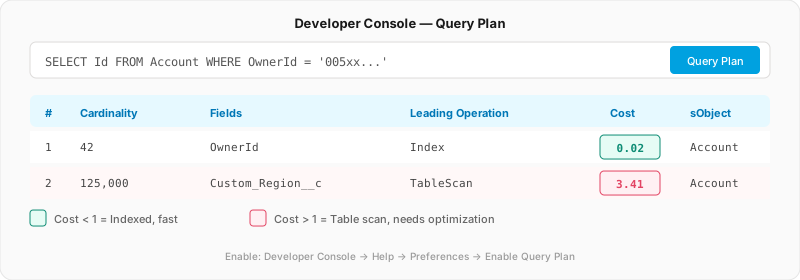
Most developers write SOQL and hope for the best. But did you know the Developer Console has a Query Plan tool that shows you exactly how Salesforce will execute your query?
How to enable it:
- Open Developer Console
- Go to Help > Preferences
- Check Enable Query Plan
- Now when you run a SOQL query, you’ll see a “Query Plan” button
It shows you the cost of each execution path, whether an index is used, and the cardinality (number of records scanned). If the cost is above 1, your query needs optimization.
Bad Query (Full Scan)
SELECT Id FROM Account WHERE Custom_Region__c = 'APAC'Good Query (Indexed)
SELECT Id FROM Account WHERE OwnerId = '005xx000001234'Custom fields aren’t indexed by default. Contact Salesforce support to request custom indexes on fields you filter frequently. Always check the Query Plan first — if the cost is above 1.0, an index request is worth raising a case for.
2. SOQL’s Semi-Join and Anti-Join
Most people write two separate queries when they need to find records based on a related object condition. But SOQL supports semi-joins and anti-joins — subqueries in the WHERE clause:
// Semi-join: Accounts that HAVE at least one open Opportunity
SELECT Id, Name FROM Account
WHERE Id IN (SELECT AccountId FROM Opportunity WHERE StageName != 'Closed Won')

// Anti-join: Accounts with NO Contacts
SELECT Id, Name FROM Account
WHERE Id NOT IN (SELECT AccountId FROM Contact)
This is significantly faster than querying both objects separately and filtering in Apex. The database handles it in a single operation.
3. WHERE vs HAVING in Aggregate Queries
Here’s a subtle but important performance trick. When filtering aggregate results, you have two options:
Slower: HAVING Only
SELECT AccountId, COUNT(Id) total
FROM Opportunity
GROUP BY AccountId
HAVING COUNT(Id) > 5
Faster: WHERE + HAVING
SELECT AccountId, COUNT(Id) total
FROM Opportunity
WHERE StageName = 'Closed Won'
GROUP BY AccountId
HAVING COUNT(Id) > 5Always prefer WHERE over HAVING when possible. WHERE filters rows before they’re grouped, reducing the dataset the database has to aggregate. HAVING filters after grouping — which means the database does more work.
4. Custom Metadata Types as Configuration Store
Stop using Custom Settings for configuration. Custom Metadata Types are deployable, packageable, and can be referenced in validation rules, formulas, and flows without Apex.
The hidden gem? You can use them to build a feature flag system:
// Static method — no SOQL limit cost!
Feature_Flag__mdt flag = Feature_Flag__mdt.getInstance('Enable_New_Pricing');

if (flag?.Is_Active__c == true) {
    // New pricing logic
} else {
    // Legacy pricing logic
}Custom Metadata static methods like getInstance() and getAll() don’t count against SOQL limits because they’re cached in the application server. However, SOQL bracket queries like [SELECT ... FROM Feature_Flag__mdt] do count against the 100-SOQL-queries-per-transaction limit. Always prefer getInstance() / getAll() for governor-limit-safe configuration reads.
5. The FOR UPDATE Clause
Race conditions are real in Salesforce. When two users update the same record simultaneously, you can get stale data. The FOR UPDATE clause locks records during a transaction:
Account acc = [SELECT Id, Balance__c FROM Account
               WHERE Id = :accountId FOR UPDATE];

// Now this record is locked — no other transaction
// can modify it until this transaction completes
acc.Balance__c -= withdrawalAmount;
update acc;
Use this for any financial calculations, inventory management, or sequential number generation where consistency matters.
Problem: A financial services org runs a Queueable job that deducts from an account balance. Under concurrent load, two jobs read the same balance simultaneously — both see $500, both deduct $200, and the final balance is $300 instead of $100. Money is disappearing.
Solution: Add FOR UPDATE to the balance query. The first transaction locks the record; the second waits until the first commits. Sequential writes, correct balance every time — no custom locking logic required.
6. Flow Error Handling with Fault Paths
Most people let Flows fail silently or show ugly error screens. But every Flow element has a fault connector (the red path) that you can wire up:
The fault path gives you access to {!$Flow.FaultMessage} — the actual error message. You can:
- Log it to a custom object for monitoring
- Send an email to the admin
- Show a friendly screen to the user instead of a crash
- Post it to a Slack channel via HTTP callout
Create a reusable Error Handler Sub-Flow that accepts an error message and context, then logs it consistently. Call this from the fault path of every flow — one fix propagates everywhere.
7. Dynamic Formula Evaluation
FormulaEval Class Details (Pilot/Beta)
This one is truly hidden. Salesforce has a FormulaEval class (pilot/beta in many orgs) that lets you evaluate formula expressions dynamically at runtime:
// Evaluate a formula dynamically
String formula = 'IF(Amount > 10000, "Enterprise", "SMB")';

FormulaEval.FormulaInstance instance =
    FormulaEval.FormulaBuilder.builder()
        .withReturnType(FormulaEval.FormulaReturnType.STRING)
        .withFormula(formula)
        .withContextObject(myOpportunity)
        .build();

String result = (String) instance.evaluate();
This opens the door to user-configurable business rules without deploying code. Store formulas in Custom Metadata and evaluate them at runtime.
8. Disable Debug Mode in Production
This is a performance hack that few people know about. When Debug Mode is enabled for a user in production, Salesforce serves unminified JavaScript for Lightning components. This can slow down page loads by 2-3x.
Check it: Setup > Debug Mode > see which users have it enabled.
Most orgs have debug mode accidentally left on for admin users who once needed it for troubleshooting. Turn it off in production for every user — it’s only for development.
Problem: A retail org notices Lightning pages feel sluggish for their sales team. Everyone blames the page layout, custom components get rewritten, but performance barely improves. A performance review is escalated to Salesforce support.
Solution: Support checks Setup > Debug Mode and finds 14 admin users have it enabled in production — all from a troubleshooting session 8 months ago. Disabling it for everyone immediately restores full Lightning performance. The custom component rewrites were unnecessary.
9. Sub-Flows: The DRY Principle for Automation
If you’re copy-pasting the same Flow logic across multiple flows, you’re doing it wrong. Sub-Flows let you create reusable automation blocks:
Common sub-flow patterns:
- Error Logger: Accepts error message + context, logs to custom object + sends email
- Notification Sender: Accepts recipient + message, handles email/Chatter/Slack routing
- Field Validator: Accepts a record, returns validation errors as a collection
When you fix a bug in the sub-flow, it’s fixed everywhere. When you copy-paste, you fix it in one place and forget the other four.
10. Relationship Queries Go 5 Levels Deep
Most developers know you can traverse one level of parent-child relationships. But since recent releases, SOQL supports up to 5 levels of relationship traversal:
// 5 levels deep: Contact → Account → Parent → GrandParent → GreatGrandParent
SELECT Contact.Account.Parent.Parent.Parent.Name
FROM Contact
WHERE Id = :contactId
For child relationships, you can nest subqueries:
SELECT Id, Name,
    (SELECT Id, LastName,
        (SELECT Id, Subject FROM Tasks)
     FROM Contacts)
FROM Account
This eliminates multiple queries and the N+1 query problem.
11. Automatic License Unassignment
This one is for admins. Previously, when you removed a permission set, you had to manually unassign the related license separately — a tedious, error-prone process.
Now, when you remove a permission set or permission set group, the related license is unassigned automatically. This alone saves hours of manual work during user offboarding or license optimization.
12. The TYPEOF Operator for Polymorphic Fields
When querying polymorphic fields like WhoId or WhatId on Task/Event, most people write ugly conditional logic. The TYPEOF operator handles it elegantly:
SELECT Id, Subject,
    TYPEOF Who
        WHEN Contact THEN FirstName, LastName, Account.Name
        WHEN Lead THEN FirstName, LastName, Company
    END
FROM Task
WHERE WhoId != null
Each branch returns different fields based on the actual object type. No more instanceof checks in Apex.
Quick Reference Card
| Gem | Category | Impact |
|---|---|---|
| Query Plan Tool | SOQL | Find slow queries instantly |
| Semi/Anti Joins | SOQL | Eliminate double-queries |
| WHERE vs HAVING | SOQL | Faster aggregations |
| Custom Metadata | Config | Governor-limit-free reads |
| FOR UPDATE | Apex | Prevent race conditions |
| Flow Fault Paths | Flow | Graceful error handling |
| Dynamic FormulaEval | Apex | Runtime business rules |
| Disable Debug Mode | Performance | 2-3x faster page loads |
| Sub-Flows | Flow | Reusable automation |
| 5-Level Relationships | SOQL | Eliminate N+1 queries |
| Auto License Unassign | Admin | Faster user management |
| TYPEOF Operator | SOQL | Clean polymorphic queries |
Which gem surprised you the most?
Drop a reaction below and let me know which of these you’ll try first. If you know a hidden gem I missed, leave it in the comments — I’m always looking for more.
How did this article make you feel?
Comments
Salesforce Tip